Elettro MultiCam
Every phone in the room. One multi-cam video.
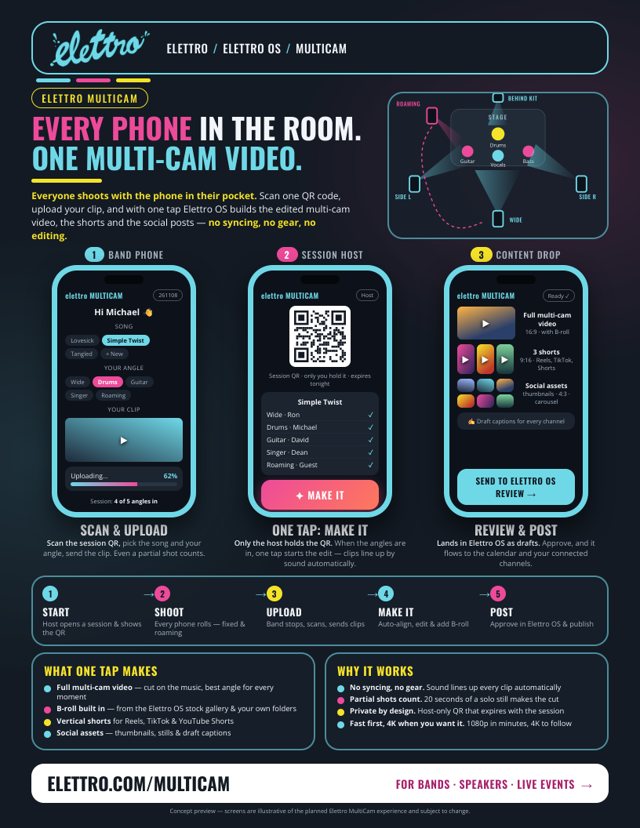
Everyone films on the phone already in their pocket, scans one QR code and uploads. We turn the pile into the edited multi-cam video, the shorts and the social posts. No app, no syncing, no camera crew.
- 0apps to install
- 1QR code for everyone
- 5–100+cameras per event
How it works
Shoot. Scan. Upload. Make it.
The phones don't need to be synced, connected or even pointed the same way. Sound lines the clips up afterwards.
1
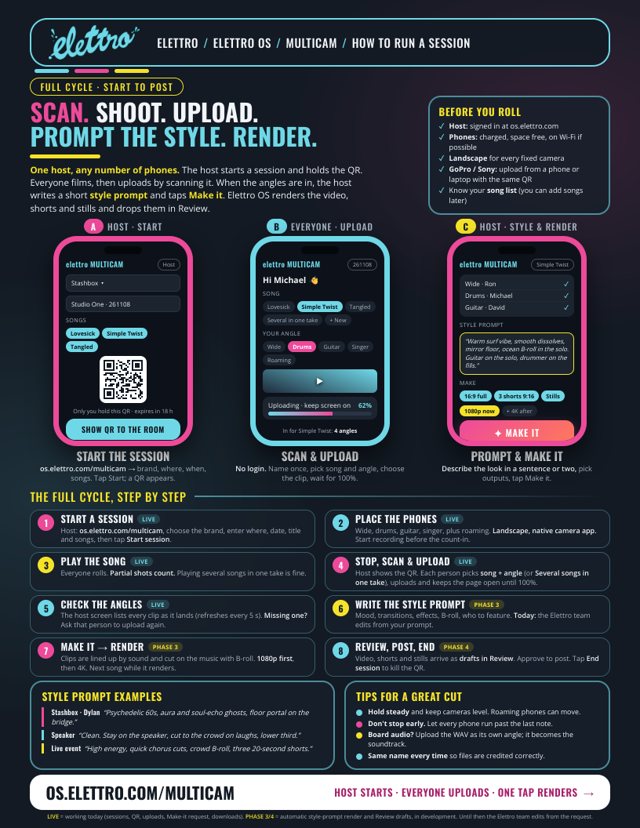
We open a session
One QR code for your event, on a screen, a sign, a ticket or a runner packet. It only works for your event and expires when it ends.
2
Everyone films
Band members, fans, family, crew. Fixed angles and roaming phones. Partial shots count: twenty seconds of a solo still makes the cut.
3
Scan and upload
No app, no login. Pick the song or the spot, pick the clip, send. Full-quality files, straight from the camera roll.
4
Make it
You describe the look in a sentence and choose the outputs. We cut the multi-cam video, the shorts and the stills, and you approve before anything posts.
Who it's for
Any room with people and phones.
It started at a band rehearsal. It works anywhere a crowd is already filming.
5PHONES
Bands & rehearsals
Every member's phone, plus the GoPro. Stop after each song, everyone uploads, and the multi-cam video of that song is on its way.
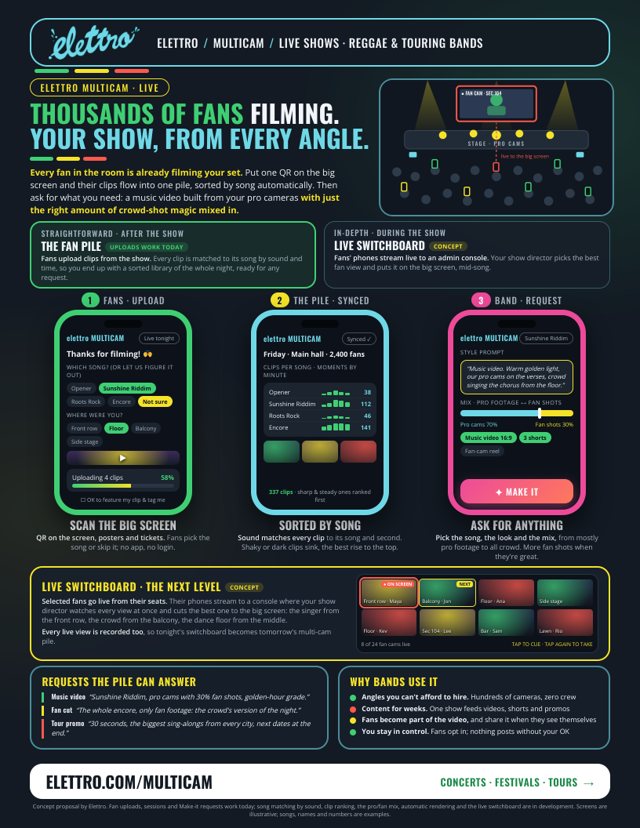
One sheet →1,000sFANS
Live shows & festivals
Fans upload from the show, every clip sorted by song. Ask for a music video built from your pro cameras with 30% crowd shots mixed in.
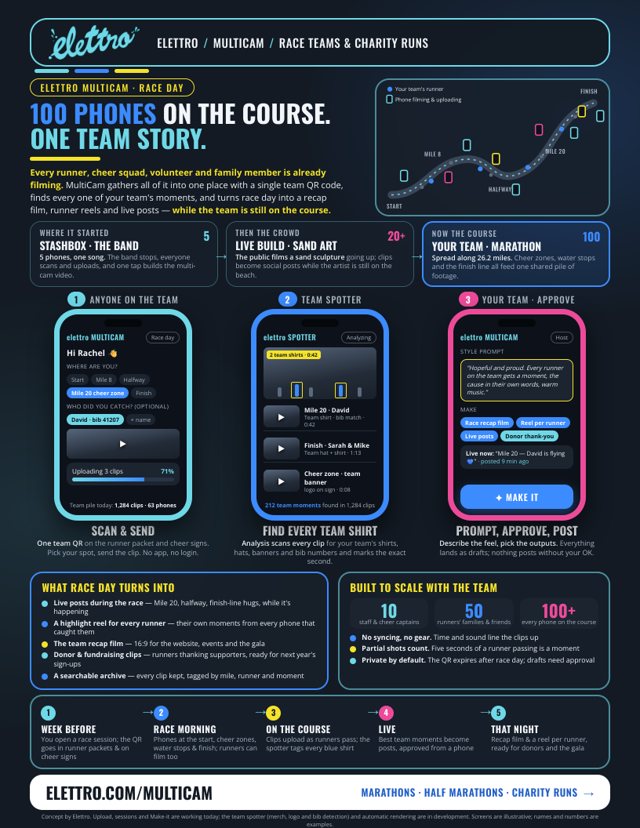
One sheet →100ON COURSE
Race teams & charity runs
Cheer squads, families and runners along 26.2 miles. Every team moment found, a reel for every runner, live posts during the race.
One sheet →20+ONLOOKERS
Live builds & artists
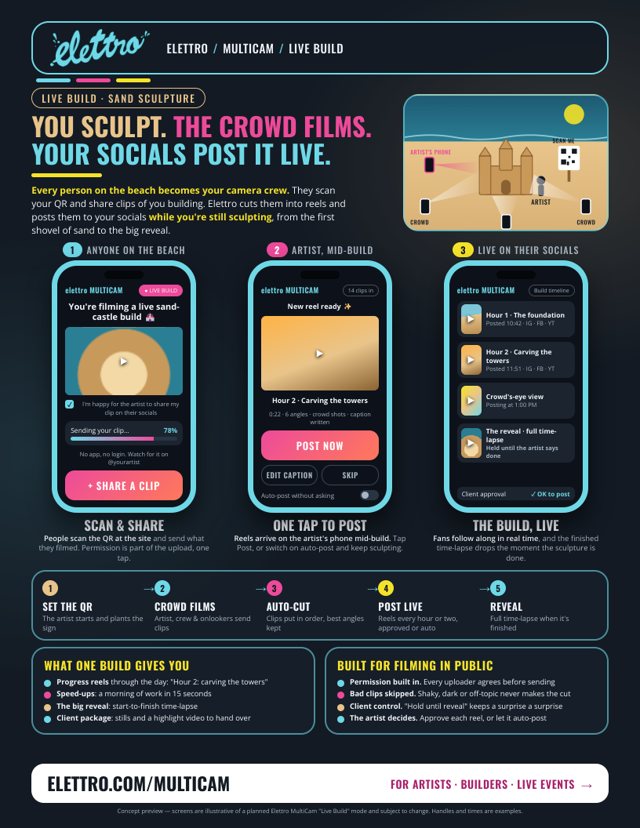
A sculpture, a mural, a build. The public films it going up, and progress reels post while the artist keeps working.
One sheet →Scenario one sheets
See it in your world.
One page per scenario: the phones, the flow and what you get. Download them, print them, pass them around. New scenarios are added as we run them.
Don't see yours?
Speakers, weddings, sports, conferences. Tell us about your event and we'll make its one sheet.
White-glove
We run it with you.
Right now every MultiCam event is hands-on. You bring the people; we handle the rest.
- 1Tell us about the eventWhat it is, where, how many people and what you want out of it.
- 2We set it upYour session, the QR code, signs and a one-line brief for everyone filming.
- 3On the day, we watch the uploadsWe see every angle arrive and chase the gaps while people are still there.
- 4We deliver the editsMulti-cam video, shorts and stills in your style, approved by you before anything posts.
What you walk away with
- The multi-cam video: cut on the music, the best angle for every moment.
- Vertical shorts for Reels, TikTok and YouTube Shorts.
- Stills and thumbnails pulled from every angle.
- B-roll mixed in from your own library or ours.
- Every raw clip, named by person, angle and song, in one place.
- Draft posts ready to approve in Elettro OS, if you publish with us.
Where it's going
What's live, and what's next.
Live today
Sessions, QR and uploads
Host-only sessions, one QR for everyone, full-quality uploads straight from phones, clips filed by song and angle, and a one-tap Make-it request per song.
In development
Style prompt, automatic render & song matching
Describe the look in a sentence; clips are lined up by sound and cut on the music, 1080p first and 4K after. Fan clips matched to the right song on their own.
On the roadmap
Spotter & live switchboard
Find every clip with your shirts, logo or banner in it. Stream chosen fans' phones to a console and put the best view on the big screen.
Questions
Before you ask.
Do people need to install an app?
No. They scan the QR code and a page opens in their phone's browser. No account, no login: they type their name once and pick their clip.
Should people record in the page or in their camera?
In their normal camera app. It gives the best quality, and the camera roll keeps a safety copy. They upload when the song or moment is over.
Does the quality hold up?
We take the original files, not compressed copies, so it's as good as the phone that shot it. We start at 1080p for speed and can finish in 4K.
How fast do we get the video?
It depends on the event and how much footage comes in. We agree on turnaround before the day; for a band session the first cuts can come the same day.
Who can upload, and who sees the clips?
Only people with your event's QR code can upload, and it stops working when the session ends. Clips go to your private library; nothing is published without your approval. For public events, uploaders agree before sending.
What does it cost?
MultiCam is a white-glove service right now, quoted per event based on the number of people, the footage and what you want made. Tell us about yours and we'll come back with a plan.
Book a session
Bring the people. We'll bring MultiCam.
Tell us about your event. We'll reply with how we'd run it and what you'd get.
- Bands, shows and festivals
- Races, charity teams and community events
- Artists, speakers and anything with a crowd